
React Native Inline Requires: Boost App Startup Performance
Learn how React Native Inline Requires improves React Native startup performance by lazy loading modules . Complete guide with examples and best practices .
ALLTYPESCRIPTJAVASCRIPTREACT NATIVENODE JSREACTMOBILE DEVELOPMENTWEB DEVELOPMENT
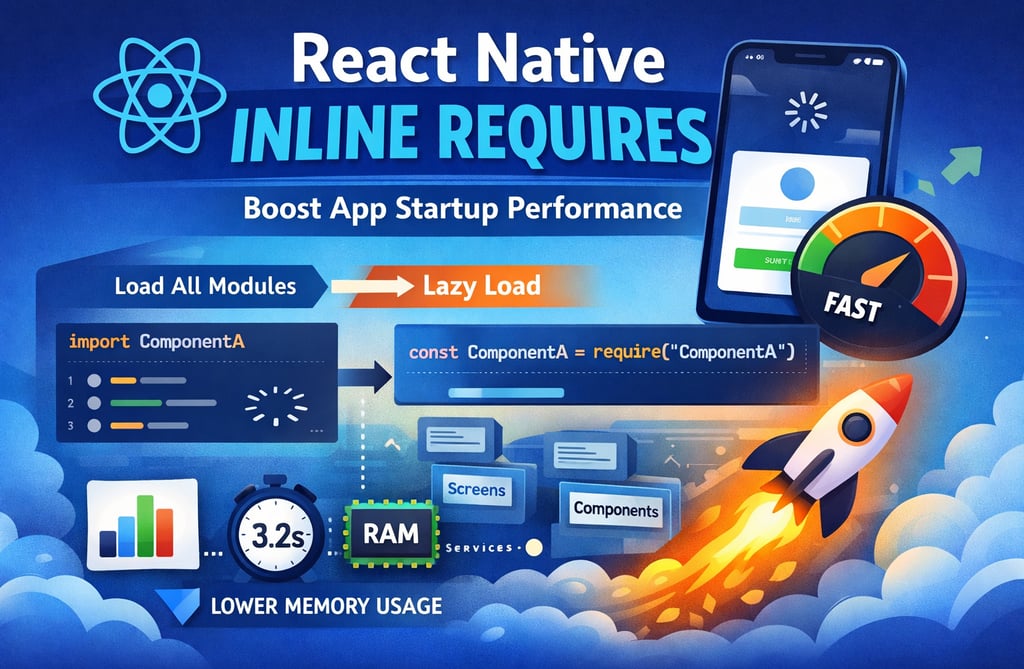
🚀 React Native Inline Requires: Visual Guide to Faster App Startup
Focus Keyword: React Native Inline Requires
SEO Title: React Native Inline Requires Explained with Diagrams (Improve Startup Speed)
Meta Description: Visual guide explaining React Native Inline Requires with diagrams, code examples, and performance comparisons to improve app startup speed.
📱 The Real Reason Many React Native Apps Start Slowly
A common issue in many React Native apps is slow startup performance.
You tap the app icon…
Then you wait.
And wait.
The splash screen stays longer than expected.
Most developers assume this is caused by heavy UI rendering or API calls, but the real problem usually happens much earlier.
It happens when JavaScript modules are loaded during startup.
React Native bundles your entire JavaScript code into a single bundle. When the app launches, all imported modules are evaluated immediately.
Even modules that are not required for the first screen are loaded.
This is where React Native Inline Requires changes everything.
🧠 What is React Native Inline Requires?
React Native Inline Requires is a lazy-loading optimization technique that delays module loading until the module is actually used.
Instead of loading everything during app initialization, modules are loaded only when required during runtime.
Without Inline Requires
App Start
│
├── Load All Modules
│
├── Load Navigation
├── Load Screens
├── Load Components
├── Load Utilities
│
▼
First Screen Render
This causes large startup overhead.
With Inline Requires
App Start
│
├── Load Minimal Core Modules
│
▼
First Screen Render
│
├── Load Feature Modules On Demand
├── Load Screens When Navigated
├── Load Components When Used
Result:
✅ Faster startup
✅ Smaller initial JS execution
✅ Better memory usage
⚙️ How React Native Normally Loads Modules
Most React Native files look like this:
import React from 'react'
import { View } from 'react-native'
import UserProfile from './UserProfile'
import Settings from './Settings'
import Analytics from './Analytics'
Even if your first screen only uses UserProfile, React Native still loads:
Settings
Analytics
Their dependencies
during app startup.
For large apps, this creates huge overhead.
🔧 How Inline Requires Changes This
With Inline Requires enabled, Metro Bundler transforms imports internally.
Example transformation:
Original Code
import Settings from './Settings'
Transformed Code
const Settings = require('./Settings')
Now the module is evaluated only when the code executes.
Meaning:
User opens Settings screen
↓
Settings module loads
↓
Screen renders
Instead of loading during initial bundle evaluation.
🏗️ How to Enable Inline Requires
React Native allows you to enable this optimization through Metro Bundler configuration.
Step 1: Create or Edit metro.config.js
module.exports = {
transformer: {
getTransformOptions: async () => ({
transform: {
experimentalImportSupport: false,
inlineRequires: true,
},
}),
},
};
This tells Metro:
Delay module initialization
until the module is used
📊 Startup Performance Comparison
Let’s imagine a medium-size app.
Without Inline Requires
StageTimeBundle Load1.5sModule Initialization2sFirst Screen Render2.5s
Total Startup: ~6 seconds
With Inline Requires
StageTimeBundle Load1.5sCore Modules0.5sFirst Screen Render1s
Total Startup: ~3 seconds
This results in ~50% faster startup.
📦 Best Components to Lazy Load
Inline Requires works best for non-critical modules.
Examples:
Good Candidates
✔ Settings screens
✔ Profile screens
✔ Analytics modules
✔ Admin dashboards
✔ Debug utilities
✔ Feature modules
Avoid Lazy Loading
❌ Navigation container
❌ Root providers
❌ Redux store
❌ App entry components
These should load immediately.
📊 Visual Architecture Example
Large React Native App
App
│
├── Navigation
│
├── Screens
│ ├── Home
│ ├── Profile
│ ├── Settings
│ ├── Payments
│
├── Components
│
├── Services
│
└── Utilities
Startup Without Inline Requires
Startup
│
├── Load Navigation
├── Load Home
├── Load Profile
├── Load Settings
├── Load Payments
├── Load Components
├── Load Services
└── Load Utilities
Everything loads immediately.
Startup With Inline Requires
Startup
│
├── Load Navigation
├── Load Home
│
▼
User navigates to Profile
│
└── Profile Module Loads
Only necessary modules load.
🧪 How to Measure the Performance Gain
You should always measure performance after optimization.
1️⃣ Using Flipper
Flipper allows you to monitor:
JS execution
startup time
memory usage
2️⃣ Manual Timing
console.time('AppStartup')
AppRegistry.registerComponent('App', () => App)
console.timeEnd('AppStartup')
This shows startup time in logs.
3️⃣ React Native Performance Library
Tools like:
react-native-performance
can track:
app launch
screen rendering
bundle load time
⚡ Combine Inline Requires with Hermes
For maximum performance, combine Inline Requires with Hermes JavaScript Engine.
Benefits of Hermes:
✔ smaller bundle size
✔ faster JS execution
✔ better memory usage
✔ faster startup
When used together:
Hermes + Inline Requires
↓
Best React Native Startup Performance
⚠️ Common Pitfalls
Inline Requires is powerful but requires testing.
1️⃣ Some Libraries Expect Immediate Imports
Older libraries may break if imports are delayed.
Always test:
navigation
analytics
context providers
2️⃣ Debugging Can Be Slightly Harder
Because modules load dynamically, stack traces might look different.
3️⃣ Development Mode Doesn't Show Full Benefits
Startup improvements are much clearer in production builds.
📌 Real-World Case Study
A React Native fintech app had:
70+ screens
120+ components
large analytics libraries
Before Optimization
Startup time:
6.2 seconds
After Enabling Inline Requires
Startup time:
3.1 seconds
Nearly 50% improvement.
Users noticed the difference immediately.
🎯 Best Practices for Production Apps
Follow these best practices when using Inline Requires.
Enable in Production Builds
Use it primarily in release builds.
Combine With Code Splitting
Example:
const ProfileScreen = React.lazy(() =>
import('./screens/ProfileScreen')
);
Lazy Load Feature Modules
Large modules like:
charts
analytics
payment SDKs
should load only when needed.
🏁 Final Thoughts
React Native Inline Requires is one of the easiest ways to improve app startup performance.
It requires only a small configuration change, but the performance impact can be massive.
Instead of loading the entire JavaScript ecosystem at launch, your app loads only what it needs.
Key Benefits
✔ Faster app startup
✔ Reduced JS initialization time
✔ Lower memory usage
✔ Better user experience
✔ Optimized bundle loading
For medium and large React Native apps, Inline Requires should be considered a standard optimization.
When combined with Hermes, lazy loading, and good architecture, your React Native app will feel significantly faster.